


Windows 11 Gets Major Redesign: New Start Menu, Smarter Features & More in 25H2 Update
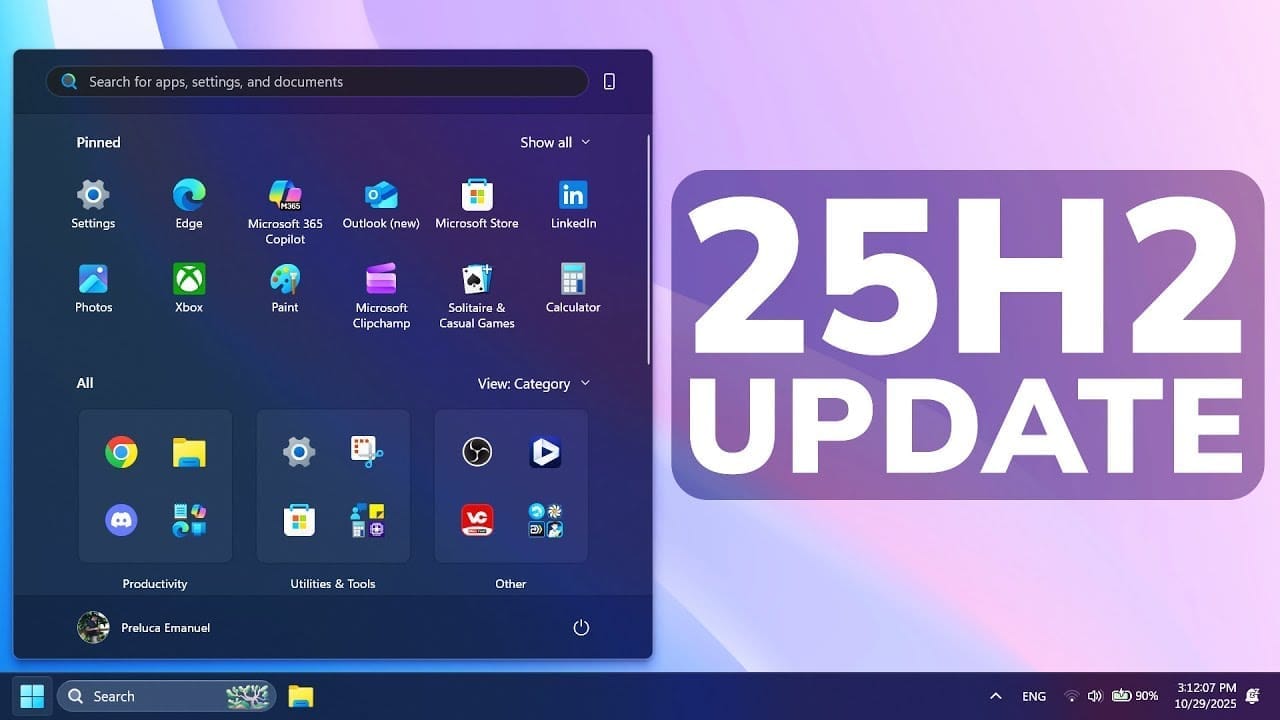
🧭 Overview: A New Era for Windows 11
Microsoft has officially begun rolling out one of the most significant updates to Windows 11, introducing a completely redesigned Start Menu, smarter taskbar, improved personalization options, and enhanced system security under the 25H2 update series.
The update — available through the KB5067036 and KB5067112 builds — is not just a visual refresh but a step towards a more fluid, intelligent, and secure Windows experience.
According to Windows Blog, this rollout is available to Insiders in the Beta and Release Preview Channels, while a wider public release is expected over the next few weeks.
🪟 What’s New in Windows 11 (25H2 and 24H2 Updates)
1. 🎨 Redesigned Start Menu
The most talked-about change is the new Start Menu, which blends modern aesthetics with smarter functionality:
Adaptive Layouts: Dynamic icon resizing and adaptive grouping for frequent apps.
Personalized Recommendations: AI-curated app and file suggestions based on user behavior.
Quick Actions: Integration of system shortcuts directly into the Start Menu.
“Windows 11’s new Start Menu finally feels intuitive and fast — the best since Windows 7,” wrote Zac Bowden from Windows Central.
2. 🔐 Administrator Protection Feature
As reported by BleepingComputer, Microsoft has introduced a new Administrator Protection mechanism.
This feature adds a verification layer whenever users attempt to run elevated commands, reducing unauthorized administrative access.
3. 💡 Colored Battery Icons & Power Insights
According to TechSpot, the new update brings color-coded battery indicators to make monitoring device health easier:
Green: Fully charged
Yellow: Medium level
Red: Low battery
This visual change improves accessibility and adds a modern flair to the taskbar.
4. 🧠 AI-Powered Recommendations
The update also enhances Windows Copilot integration, allowing contextual suggestions for file access, app usage, and even system settings.
It complements Microsoft’s push for AI-driven experiences across its products, from Office 365 to Edge.
5. ⚙️ Performance and Security Enhancements
Neowin and Windows Report note several background improvements:
Memory diagnostics for proactive issue detection
Fixes for Windows Hello PIN and input bugs
Optimized system performance for low-power devices
The KB5067109 build specifically revamps the Settings app, introducing Device Cards for quick device management.
6. 🎯 New Out-of-Box Experience (OOBE)
The KB5067112 update introduces a revamped setup screen that displays “Personalized Offers” and setup recommendations.
While Microsoft claims it aims to “enhance user onboarding,” some users — as reported by Windows Report — find it too commercialized.
7. 🧩 Customization and Widgets
TechRepublic highlights the new customizable Start Menu tiles and widget management tools:
Users can pin frequently used files or folders.
Widgets are now resizable and can show data from multiple apps.
💻 How to Get the Windows 11 25H2 Update
If the update doesn’t appear automatically:
Go to Settings → Windows Update.
Click Check for updates.
If unavailable, use the Windows 11 Installation Assistant or download the .MSU file from Microsoft’s official site (as per Windows Latest’s direct download links).
🧰 Insider Builds: What’s in Testing
Windows 11 Insider Preview Build 26120.6982 (Beta Channel) — announced by Amanda Langowski — includes:
Copy & Search in Taskbar for instant web queries.
Refined context menus with smoother animations.
Improved networking and storage reliability.
These builds indicate Microsoft’s plan to phase in AI-led desktop interactions by early 2026.
🧩 Expert Opinions and User Reactions
💬 TechRadar warns:
“The new Start Menu looks great but may not be stable for all users yet. Waiting for a few patch rounds is advised.”
💬 ZDNet adds:
“Customization remains Windows 11’s biggest strength. Even if users dislike the Start Menu, free alternatives like StartAllBack or Open-Shell offer flexibility.”
💬 Windows Central confirms:
“This is just the start of a broader Windows evolution — 2026 will see deeper AI integration and cloud-based syncing features.”
📊 What It Means for Users
With Windows 10 support officially ending, Microsoft’s focus has fully shifted to Windows 11’s ecosystem.
The 25H2 and 24H2 builds represent not only cosmetic upgrades but also foundational changes in security, AI, and usability — making Windows 11 future-ready.
🧭 Final Thoughts: Should You Upgrade Now?
If stability is your top concern, you might want to wait until mid-November when Microsoft finalizes patch updates.
However, if you’re an enthusiast or power user, the Windows 11 25H2 update is a must-try — it’s smoother, smarter, and visually stunning.
🚀 Quick Summary
FeatureDescriptionSourceNew Start MenuRedesigned layout, AI recommendationsMint, Windows LatestAdministrator ProtectionEnhanced admin verificationBleepingComputerBattery IconsColor-coded for clarityTechSpotOOBE OffersNew personalized setup flowWindows ReportAI EnhancementsImproved Copilot integrationWindows CentralSettings RevampDevice Cards and smoother UINeowinInsider UpdatesCopy & Search, improved storageThurrott.com
🧭 Conclusion
Microsoft’s latest Windows 11 update reflects its commitment to user experience and innovation.
From a revamped Start Menu to enhanced AI-powered personalization, Windows 11 (25H2) is redefining desktop computing.
While minor issues persist, the direction is clear — a smarter, faster, and more adaptive Windows experience for all.

Press Release on Our All Websites for Powerful Online Presence
Get your brand featured with a world-class press release, published across all our high-authority websites — complete with powerful do-follow backlinks. Crafted to meet global press release standards, our service ensures maximum credibility, visibility, and SEO impact. Special pricing and exclusive offers are available for a limited time. Contact us today at sunil@justbaazaar.com to elevate your brand’s presence."
ABOUT US
JB Daily News Since 2018


Created with ©systeme.io